Ecotank Et 2800 Et 2803 Specs, Features, and Value: Is it worth the price tag?
The Epson EcoTank ET-2800 and ET-2803 are two closely related entry-level supertank all-in-one printers aimed at home users and small offices that prioritize low ongoing ink costs. Both models adopt Epson's cartridge-free EcoTank design with refillable ink bottles and promise very high page yields from the included inks. This article examines their specifications, real-world performance, common use cases, and whether either model represents good value for typical buyers.
Introduction
In recent years, refillable "supertank" printers have become the most attractive option for buyers frustrated by rising cartridge costs. Epson's EcoTank line is one of the better-known families in this category. The ET-2800 and ET-2803 are compact, budget-friendly AIO (print/scan/copy) machines that aim to replace consumable-heavy inkjets for users with steady monthly page counts. At first glance the two models appear identical; however, potential buyers will want to understand the small differences, practical performance, and trade-offs before committing.
Product overview and core features
Both the ET-2800 and ET-2803 are designed around the same platform and share most hardware and software features. They are intended for low-to-moderate printing volumes in homes, home offices, and small businesses that need color printing without high per-page ink expenses. Key shared features include:
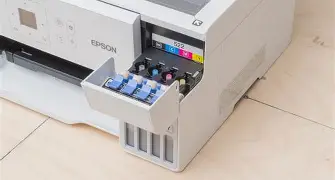
- Cartridge-free ink system: Front or side-mounted refillable ink tanks paired with spill-resistant ink bottles.
- High ink yield: Included ink kit that delivers thousands of pages before refilling—designed to significantly reduce per-page cost versus cartridges.
- All-in-one functionality: Flatbed scanner for document scanning and copying, plus basic copy features such as reduce/enlarge and multiple copies.
- Connectivity: Wi‑Fi, Wi‑Fi Direct, USB, and mobile printing support (AirPrint, Mopria, and Epson mobile apps).
- Compact footprint: Small enough to sit on a desk or shelf, suitable for tight home office setups.
Typical specifications
While specific spec sheets may vary slightly by region or revision, representative specifications for both models are:
- Print technology: 4-color inkjet (CMYK) with MicroPiezo printhead technology.
- Print resolution: Up to 5760 x 1440 dpi for high-detail document and photo output.
- Print speed: Approximate ISO speeds in the 5–10 pages per minute (ppm) range depending on color vs black and document type; faster for draft/plain text.
- Scanner: Flatbed CIS scanner with optical resolutions commonly up to 1200 x 2400 dpi.
- Input capacity: Around 100 sheets rear feed (single tray).
- Borderless printing: Limited borderless options (typically 4x6" photo sizes).
- Duplex: No automatic duplex unit; duplex is manual only.
- Display: Small control panel display for basic setup and status.
- Paper sizes: Supports up to Legal (8.5" x 14") for plain paper tasks.
Where the two models differ
Functionally, the ET-2800 and ET-2803 are effectively the same printer. The differences are largely non-technical and revolve around retail packaging, regional SKUs, and occasional firmware/labeling variations. Typical distinctions buyers may notice include:
- Retail channel and SKU: One model might be marketed or sold exclusively through specific big-box retailers or in certain regions while the other is more widely distributed.
- Packaging contents: Slight variation in bundled items or printed setup guides; some sellers include additional setup media where others do not.
- Firmware or default language packs: Small firmware variations that affect default settings or preinstalled languages depending on region.
None of the above differences affect print quality, ink yield, or the core user experience—so selecting between the two usually comes down to regional availability and price at purchase.
Detailed product analysis
This section examines how the ET-2800/ET-2803 perform in the areas buyers care about: print quality, running costs, reliability, speed, ease of use, and suitability for specific tasks.
Shop the latest Electronics picks on Amazon.
Shop Amazon →Print quality
For everyday documents—letters, invoices, web printouts—the output is clean and more than adequate for home or business use. Text is crisp at reasonable font sizes, and color graphics reproduce with decent vibrancy. The quoted maximum resolution (5760 x 1440 dpi) gives the machines headroom to produce acceptable photo prints on quality photo paper; however, these printers are not optimized as dedicated photo printers. For casual photo printing and social media snapshots they perform well, but photographic enthusiasts should expect inferior color depth and fine-grain tonal reproduction compared with mid-range photo-focused inkjets.
Running costs and ink yield
This is where EcoTank models shine. The included ink bottles are designed to deliver thousands of pages before replacement, and replacement ink bottles remain significantly cheaper per page than cartridge replacements. Buyers with predictable monthly volumes will quickly see cost savings. Real-world yields depend on content: heavy color graphics and photos consume more color ink; documents with dense coverage (charts, flyers) will use more ink as well.
Speed and daily throughput
These machines target the moderate user. They handle burst printing for short to medium print jobs comfortably, but they are not built for sustained high-volume production. For households or micro-offices printing up to a few hundred pages per month, throughput is adequate. For small businesses needing several thousand pages monthly, a higher-tier business inkjet or laser may be more appropriate.
Reliability and maintenance
Refillable tanks eliminate frequent cartridge swaps, lowering waste and mechanical wear on cartridge latches. Routine maintenance is similar to other inkjets—occasional nozzle checks, printhead cleaning cycles, and careful use of genuine inks to avoid clogging. Users who print infrequently should run head checks and occasional prints to prevent clogging, a common caveat with thermal or piezo inkjet heads when left unused for long periods.
Ease of setup and daily use
The setup process is generally straightforward: fill the visible ink tanks from labeled bottles, complete a short software or app-based network setup, and begin printing. The small onboard display handles basic tasks, while the companion mobile app simplifies scanning and status checks. Wi‑Fi Direct is valuable when a home or small-office network is unavailable, enabling direct device-to-printer printing from phones or tablets.
What buyers typically care about—and how these models respond
- Low ongoing cost: Excellent—EcoTank design fulfills the promise of much lower per-page ink costs.
- Print quality for documents: Very good—suitable for professional-looking reports and client materials.
- Photo printing: Acceptable for casual photos but not ideal for color-critical photography.
- Compact size: Good fit for small workspaces; beware of extended paper trays if desk space is extremely limited.
- Reliability for occasional use: Adequate if owners practice occasional maintenance to avoid head clogs.
Pros & Cons
Pros
- Low cost per page thanks to high-yield refillable ink bottles and included ink set.
- Compact all-in-one design suitable for small offices and home workspaces.
- Strong connectivity: Wi‑Fi, Wi‑Fi Direct, mobile printing support and compatibility with common ecosystems.
- Simple and intuitive refill process for ink tanks, reducing mess and waste.
- Good text and everyday color document quality at a much lower long-term cost than cartridge printers.
Cons
- No automatic duplexing—double-sided prints require manual paper flipping.
- Not intended for high-volume production environments; duty cycle and speed are modest.
- Photo quality is adequate but not competitive with dedicated photo printers.
- Users who print infrequently must perform periodic maintenance to avoid clogs.
- Differences between ET-2800 and ET-2803 are cosmetic/retail-only; confusion over SKUs can complicate warranty or support in some regions.
Side-by-side comparison
Below is a concise HTML table comparing the key attributes of the two models. As noted, most columns will be identical because the devices share the same platform.
Find top-rated Electronics products at great prices.
Shop Amazon →| Feature | EcoTank ET-2800 | EcoTank ET-2803 |
|---|---|---|
| Print / Scan / Copy | Yes | Yes |
| Ink System | Refillable EcoTank (CMYK) | Refillable EcoTank (CMYK) |
| Included Yield | Thousands of pages from included bottles | Thousands of pages from included bottles |
| Print Resolution | Up to 5760 x 1440 dpi | Up to 5760 x 1440 dpi |
| Scanner | Flatbed CIS (up to ~1200 x 2400 dpi) | Flatbed CIS (up to ~1200 x 2400 dpi) |
| Paper Tray | ~100-sheet rear feed | ~100-sheet rear feed |
| Auto Duplex | No (manual duplex) | No (manual duplex) |
| Connectivity | Wi‑Fi, Wi‑Fi Direct, USB, mobile printing | Wi‑Fi, Wi‑Fi Direct, USB, mobile printing |
| Retail Differences | More widely distributed (region dependent) | Often sold under specific retail SKUs (region dependent) |
Buying guide: who should choose these models?
When deciding if the ET-2800 or ET-2803 is right, the buyer should weigh personal printing habits, priorities, and environment. The following guidance helps match common user profiles to these models.
Best for
- Budget-conscious home users: Those who want decent document quality but hate frequent cartridge purchases will find the EcoTank value proposition attractive.
- Home offices and micro-businesses: Small teams with modest monthly page counts benefit from low running costs and all-in-one convenience.
- Students and remote workers: Individuals who print coursework, reports, and occasional color handouts will appreciate the low per-page cost.
Consider other options if
- High-volume printing: A busy small business that prints thousands of pages per month might be better served by a higher-duty office inkjet or an entry-level laser with a faster engine and higher monthly duty cycle.
- Professional photo printing: Photographers or creative professionals who demand precise color and extreme tonal detail should consider a dedicated photo printer.
- Automatic duplex required: Workflows that require frequent double-sided printing benefit from devices with built-in auto duplexers to save time and reduce manual intervention.
Practical buying tips
- Check the total cost of ownership: Compare initial price plus the cost and capacity of replacement ink bottles rather than focusing only on the up-front price.
- Verify local warranty and support: SKU variations sometimes mean different regional packaging—buyers should confirm warranty terms and local support channels for the exact model being purchased.
- Consider frequency of use: If printing infrequently, plan on occasional maintenance prints to keep nozzles clear; some retailers sell maintenance kits or recommend periodic usage routines.
- Watch for retailer exclusives: If a particular SKU appears cheaper, verify whether it is a region-specific ET-2803 or ET-2800 and whether the seller's coverage meets expectations.
- Test mobile printing: Before relying on app-based workflows, confirm compatibility with the primary mobile devices and apps used in the home or office.
Real-world use cases
Several practical scenarios demonstrate how these models fit into daily life:
- Family home with moderate printing: Printing school assignments, recipe pages, boarding passes, and holiday photos—low ink cost reduces surprise expenses over a school year.
- Home-based consultant: Producing proposals, one-page flyers, and scanned client receipts—scanning and decent document print quality satisfy most small-business needs.
- Student apartment: Limited space and budget make a compact EcoTank printer an attractive option for term papers, group project handouts, and poster draft prints.
- Small non-profit or community group: Preparing newsletters, volunteer schedules, and event flyers in-house without ongoing cartridge expense concerns.
Conclusion
The Epson EcoTank ET-2800 and ET-2803 deliver the core promise of supertank printers: a low cost per page with convenient all-in-one features in a compact package. For the majority of home users and small offices that print at moderate volumes, they represent a sensible, economical choice. The two SKUs are essentially the same in day-to-day use; any differences are typically limited to retailer channels or minor regional packaging variations.
Buyers who prioritize low ongoing costs, straightforward ink refills, and good document quality will find either model worthwhile. Conversely, those who need automatic duplexing, very high duty cycles, or superior photo reproduction would be better served by more feature-rich or specialized devices. Ultimately, the ET-2800/ET-2803 pair are strong contenders for anyone who wants to escape cartridge inflation without stepping up to a larger, more expensive office printer.